
GoogleSheetsCraft
Wherein we revel in the unending joy of bending spreadsheets to our will......
Note: Most of these Sheets were created for use in my overwhelming teaching job to automate tasks and make they myriad administrative tasks more efficient. Every Sheet shared here is a copy of the actual sheet with all personally identifying or private data changed to randomly generated data - no actual, real student, parent, or school information is shared in these Sheets linked here, which are only Data-Masked copies of my working Sheets.
Yearly School Day Calculator:

In order to have a solid reference for all of my spreadsheets, I created a Sheet that calculates the weekdays, weekday dates, the week numbers, the 5 day rotating cycle days, the marking period numbers, the number day in each marking period, and whether each successive Monday is a Chorus day or Orchestra day for that weekly Monday rotation. I reference this sheet for any of this information in any of my downstream sheets. Click on the photo of the sheet to go to a shared link of the sheet.
This sheet also calculates missed Orchestra Classes because between the Monday rotation, Monday Holidays, and school events, we were missing over 50% of our classes, and I did this for years to build data to that fact. The past year had some changes that helped, and only ~30% of classes were missed.
Orchestra-Chorus Rotation
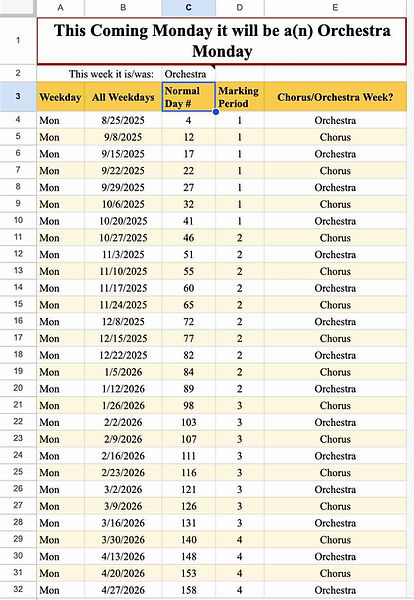
This Sheet draws from my Yearly School Day Calculator using an IMPORTRANGE, and then pulls the Mondays we are in school into a table that is easily readable. A1 comes from the Import Sheet which calculates the current day, and either says: "Today is an Orchestra day) (or Chorus, depending), or "This Coming Monday it will be a(n) Orchestra Monday" (or Chorus). C2 reaffirms which day the past Monday was.
I post this public sheet on my website, in my Google Classroom, and email it to my students and the teachers impacted by this rotation at the befinning of the year. It it regularly helpful to me to check what week it is!
Orchestra Admin Data
Note: Reiteration that all of this data is randomly generated and fake. No real, actual student or parent data is included in this preview, nor on the linked sheet; it is all fake names and data for the purposes of demonstration as well as privacy of the real people.

This Sheet does a LOT! First and foremost, it is a repository of student and parent data (data in this photo and link is fake). It also has a sheet to track students/data that are no longer playing in Orchestra. It also has an email query where I can query all sorts of combinations of email addresses and copy them to an email message, or use them in FormMule scripts to auto email all the things I auto email students and parents. It also pulls out student names by their instrument and their grade level to make copying and pasting into concert programs simpler and automatically updated. Our school emails use graduation date to construct email addresses, so I have a table to update the current year, and the datasheet updates all the emails based on the Grade column. I still have to update the students' grade levels manually, but that is a failsafe in case a student is held back, and that keeps the emails current. Many of my other sheets draw data in from this one.
Click on the photo to go to the copy of this Sheet to see how it is constructed and the formulas used. Again, All the data in this sheet and the link is randomly generated for demonstration purposes in a copy Sheet, and not data on real students or parents.
Bell Schdule at one of my Schools

This Sheet is the bell schedule at one of my schools. Since Lessons are only half a period long, I have created a schedule I can draw from that has the middle of the periods. We also have an "Activity Period" on certain days, so I added that schedule also so that I can pull that data to other sheets. This also has another tab for the 2 hour delay period schedule. I hang these on the bulletin boards at each of my rooms in each school, so I formatted this in a good format for chart-reading.
I was also teaching after school multiple days a week until 5:30 to try and get more students lesson time (for free), so I added an "11th" period.
Master Schedule
Note: Reiteration that all of this data is randomly generated and fake. No real, actual student or parent data is included in this preview, nor on the linked sheet; it is all fake names and data for the purposes of demonstration as well as privacy of the real people.


This Sheet is a workhorse! Scheduling between two buildings with vastly disparate schedules is fiendishly difficult, so difficult that I lost the ability to teach lessons for all of my Sr. High students this year. The main working tab is the MergeDoc tab, where I enter the data. Long ago I built this as a calendar-merge system, and it worked fine, but students weren't allowed to use their calendar, so it was moot. Some of the hidden columns are vestigial from that. The highlighted columns I usually have hidden, they're just formula columns which calculate the lesson times based on the periods in Col E (drawn in from my Bell Schedule Sheet in an IMPORTRANGE) or the Elementary times in Cols H and I.
Columns F through I track what lesson or class it is, who is in the group (again - random names here), and format them with a Char(10) so they are all drawn into the printable Schedule Sheets in one cell to avoid formatting issues when changing names.
There are several printable Sheets: MasterSchedule, ElePrintable, and HSPrintable. These can be shared with teachers and students, and I also print them and hang them in each room I teach in.
Other bells and whistles in this sheet is that it draws in the data from my auto-reminder sheet which has one student per row, and has the day, time, and email for their scheduled lesson. This auto reminder sheet is a separate sheet that sends automatic reminder emails the day prior to their scheduled lesson, since I can't see my students regularly to remind them.
I also have a tab in this Sheet that separates students out into individual rows based on their grade level and lesson order. This allows me a place to copy and paste names into my grading sheets that are in order of their weekly lesson, which is super helpful when trying to score students at the end of a 20 minute lesson while the next lesson is already arriving.
Click on the photo to go to the copy of this Sheet to see how it is constructed and the formulas used. Again, All the data in this sheet and the link is randomly generated for demonstration purposes in a copy Sheet, and not data on real students.
Lesson Reminders
Note: Reiteration that all of this data is randomly generated and fake. No real, actual student or parent data is included in this preview, nor on the linked sheet; it is all fake names and data for the purposes of demonstration as well as privacy of the real people.

Orchestra Instrument Inventory
This Sheet is the aforementioned Lesson Reminder Sheet. Since I'm in Multiple buildings as many as 4 times a day, it is impossible for students to just come see me and ask questions, so I try and provide regular check-ins. This one is automatic. I send reminders every week the day before their lesson mid-day.
The Sheet pulls data from the Master Schedule Sheet and orders the students by lesson time during the week. It also has a trigger column which tests text(today(),+1 "dddd" against Column B (check whether tomorrow matches col B) and then puts a "send" trigger in that row.
I use FormMule to send the emails, and there I just have to set the send condition to the trigger column, and make all of the links to the columns for day, time, email, and first name into the template, and it sends a personalized email to each student every week on the day before their lesson.
I also use an AppsScript called ClearRange every Friday night to clear column I of the Send Statuses, otherwise FormMule won't send a new email the next week.
This has been an AMAZING addition to my tools, and students are forgetting their lesson far less!!!
Note: Reiteration that all of this data is randomly generated and fake. No real, actual student or parent data is included in this preview, nor on the linked sheet; it is all fake names and data for the purposes of demonstration as well as privacy of the real people.

I am very proud of this sheet, and it has served me very well over the past decade as I developed it. There are several facets of it, and each saves me tons of bandwidth and work. The primary is the Lending Log. It is a Google Form I fill out on my phone, that populates the LendingLog Sheet. I fill out the name (first_last), the school serial number, the condition it was transferred in, the latest condition logged, and either the date borrowed or the date returned. The Sheet looks up the most recent date that instrument was borrowed or returned, the last person to use it (and if/when they returned it), where it has last been logged, the email of the student borrowing it (there is a FormMule that runs and sends a receipt to the email), the school year the loan or return was effected, and all the information for that instrument drawn from the PerpetualInventory tab.
I log each instrument every year, where I use a Google Form on my phone to enter the school serial #, the location (Ele School, HS, or At Home with Student), the condition, if it needs repair, what repairs needed, whether the instrument must be discarded, and a photo of the discarded instrument - to log why it's being discarded. If it is to be discarded, I use AutoCrat to automatically generate an Inventory Disposal Form.
I also use a Google Form to log repairs.
The Inventory Sheet does multiple things that are very useful: 1. I have it populate a table with the current locations of every instrument in the In Service Inventory and whether they've been logged in the past year. 2. I have it create a table of In Use Instruments that tells me who has each instrument. 3. I have it create a Missing In Action table that shows any instruments in the In Service Inventory that haven't been logged so I can search them down. 4. I built a Lending History Query that I can use to look up an instrument by Student Name, or School Serial Number. This is especially helpful when an instrument shows up where it shouldn't be without a name tag, or to look up an instrument by student if my sheets say they still need to return it and they have. It also gives the history of the instrument, because I love the nostalgia of looking at who has played that instrument in the past...
This Sheet also keeps a table of discarded instruments.
When I get new instruments for the fleet, I put them into Perpetual Inventory using my serial number system: first number = what instrument (violin, viola, cello, bass), second two are the size (44 for 4/4, 15 for 15" or 15.5", etc), the next two are a yearly serial, and the final two are the year it was entered into the fleet. I still have many instruments that were entered with a different system, but this is my new system that has some meaning baked in. I glue a serial number tag inside the instrument, and use a paint pen to also mark it on the butt-end of the case so when they are in storage I can see what they are easily. When I log them out to a student, I use masking tape and a sharpie to put their names of the butt-end also, for the same reason.
This system has proven invaluable, and saves me a boatload of time while still keeping excellent records.